My Router - Part 4
Encrypted Web servers, plus DoT and WebDAV servers

Define Our Variables
We’re going to define a few variables to make this easier for you. Replace the value of each variable before continuing:
1
2
3
4
5
6
export DOMAIN=example.com
export USERNAME=username
export PASSWORD=password
export DYNU_CLIENT_ID=REDACTED
export DYNU_SECRET=REDACTED
export EMAIL=username@example.com
Dynamic DNS (DDNS) service
I signed up for free domain name via DynU. You can too! The DDNS service that I am listing in this part of my router series uses DynU as the DDNS host. Alternative hosts require a different configuration than what is shown.
Let’s install the DDNS service, as well as the LUCI app:
1
apk add luci-app-ddns bind-host
We need to configure the service, then restart the service:
1
2
3
4
5
6
7
8
9
10
11
12
13
14
15
16
17
18
19
20
21
22
23
24
25
26
27
uci -q del ddns.global.upd_privateip
uci set ddns.global.ddns_rundir='/var/run/ddns'
uci set ddns.global.ddns_logdir='/var/log/ddns'
uci -q del ddns.myddns_ipv4
uci -q del ddns.myddns_ipv6

uci set ddns.Home=service
uci set ddns.Home.enabled='1'
uci set ddns.Home.lookup_host=${DOMAIN}
uci set ddns.Home.domain=${DOMAIN}
uci set ddns.Home.username=${USERNAME}
uci set ddns.Home.password=${PASSWORD}
uci set ddns.Home.use_https='1'
uci set ddns.Home.cacert='/etc/ssl/certs'
uci set ddns.Home.use_logfile='0'
uci set ddns.Home.check_interval='1'
uci set ddns.Home.update_url='http://api.dynu.com/nic/update?hostname=[DOMAIN]&myip=[IP]&username=[USERNAME]&password=[PASSWORD]'
uci set ddns.Home.force_interval='2'
uci set ddns.Home.ip_source='network'
uci set ddns.Home.ip_network='wan'
uci set ddns.Home.interface='wan'
uci set ddns.Home.use_syslog='2'
uci set ddns.Home.check_unit='minutes'
uci set ddns.Home.force_unit='minutes'
uci set ddns.Home.retry_unit='seconds'
uci commit
service ddns restart
Get a SSL Certificate from Let’s Encrypt
Let’s install the ACME program and LUCI app:
1
apk add luci-app-acme acme-acmesh-dnsapi
We need to rebuild the ACME configuration file, since it contains garbage that I don’t want in the firmware I is building. Once completed, the ACME service needs to be restarted.
1
2
3
4
5
6
7
8
9
10
11
12
13
14
15
cp /dev/null /etc/config/acme
uci set acme.server=acme
uci set acme.server.account_email=${EMAIL}
uci set acme.server.debug='0'
export SECTION=${DOMAIN//\./_}
uci set acme.${SECTION}=cert
uci set acme.${SECTION}.enabled='1'
uci add_list acme.${SECTION}.domains=${DOMAIN}
uci add_list acme.${SECTION}.domains='*.'${DOMAIN}
uci set acme.${SECTION}.validation_method='dns'
uci set acme.${SECTION}.dns='dns_dynu'
uci add_list acme.${SECTION}.credentials='Dynu_ClientId="'${DYNU_CLIENT_ID}'"'
uci add_list acme.${SECTION}.credentials='Dynu_Secret="'${DYNU_SECRET}'"'
uci commit
service acme restart
Now, for some reason, executing service acme renew at this point fails. I don’t understand why, but executing the following command instead gets the SSL certificate. This is only necessary for the absolute first time getting the SSL certificate, though…
1
/usr/lib/acme/client/acme.sh --ecc -d ${DOMAIN} -d *.${DOMAIN} --keylength ec-256 --accountemail ${EMAIL} --server letsencrypt --dns dns_dynu --issue --home /etc/acme
Replace UHTTPD with NGINX
Let’s remove UHTTPD from the router and install NGINX. It’s going to be necessary to do some of the things I want to do:
1
2
apk del luci-light uhttpd-mod-ubus luci luci-ssl
apk add nginx-full nginx-mod-luci luci-nginx luci-nginx
The initial /etc/config/nginx file contains templates and stuff that I don’t need. Let’s start over with that file!
1
2
3
cp /dev/null /etc/config/nginx
uci set nginx.global=main
uci set nginx.global.uci_enable='true'
We’ll define an default HTTP server that redirects HTTP requests to HTTPS:
1
2
3
4
5
uci set nginx.http_default=server
uci add_list nginx.http_default.listen='80 default_server'
uci add_list nginx.http_default.listen='[::]:80 default_server'
uci set nginx.http_default.server_name='_redirect2ssl'
uci set nginx.http_default.return='302 https://$host$request_uri'
We’ll define an HTTP server that redirects http://openwrt/, http://openwrt.lan, and http://openwrt.local to https://router.example.com:
1
2
3
4
5
uci set nginx.http_router=server
uci add_list nginx.http_router.listen='80'
uci add_list nginx.http_router.listen='[::]:80'
uci set nginx.http_router.server_name='openwrt.lan openwrt.local openwrt'
uci set nginx.http_router.return='302 https://router.'${DOMAIN}'$request_uri'
Default HTTPS redirects HTTPS requests to https://router.example.com:
1
2
3
4
5
6
7
8
9
10
11
12
uci set nginx.https_default=server
uci add_list nginx.https_default.listen='443 ssl default_server'
uci add_list nginx.https_default.listen='[::]:443 ssl default_server'
uci set nginx.https_default.server_name='_lan'
uci add_list nginx.https_default.include='restrict_locally'
uci add_list nginx.https_default.include='conf.d/*.locations'
uci set nginx.https_default.ssl_certificate='/etc/acme/'${DOMAIN}'_ecc/'${DOMAIN}'.cer'
uci set nginx.https_default.ssl_certificate_key='/etc/acme/'${DOMAIN}'_ecc/'${DOMAIN}'.key'
uci set nginx.https_default.ssl_session_cache='shared:SSL:32k'
uci set nginx.https_default.ssl_session_timeout='64m'
uci set nginx.https_default.access_log='off; # logd openwrt'
uci set nginx.https_default.return='302 https://router.'${DOMAIN}'$request_uri'
Let’s define the HTTPS server serving LUCI (https://router.example.com):
1
2
3
4
5
6
7
8
9
10
11
uci set nginx.https_router=server
uci add_list nginx.https_router.listen='443 ssl'
uci add_list nginx.https_router.listen='[::]:443 ssl'
uci set nginx.https_router.server_name='router.'${DOMAIN}
uci add_list nginx.https_router.include='restrict_locally'
uci add_list nginx.https_router.include='conf.d/*.locations'
uci set nginx.https_router.ssl_certificate='/etc/acme/'${DOMAIN}'_ecc/'${DOMAIN}'.cer'
uci set nginx.https_router.ssl_certificate_key='/etc/acme/'${DOMAIN}'_ecc/'${DOMAIN}'.key'
uci set nginx.https_router.ssl_session_cache='shared:SSL:32k'
uci set nginx.https_router.ssl_session_timeout='64m'
uci set nginx.https_router.access_log='off; # logd openwrt'
Since we install Adguard Home in the last part, let’s define a HTTPS server serving Adguard Home (https://webdav.example.com).
1
2
3
4
5
6
7
8
9
10
11
12
uci set nginx.https_adguardhome=server
uci add_list nginx.https_adguardhome.listen='443 ssl'
uci add_list nginx.https_adguardhome.listen='[::]:443 ssl'
uci add_list nginx.https_adguardhome.include='restrict_locally'
uci add_list nginx.https_adguardhome.include='conf.d/error_403.locations'
uci set nginx.https_adguardhome.server_name='adguardhome.'${DOMAIN}
uci set nginx.https_adguardhome.ssl_certificate='/etc/acme/'${DOMAIN}'_ecc/'${DOMAIN}'.cer'
uci set nginx.https_adguardhome.ssl_certificate_key='/etc/acme/'${DOMAIN}'_ecc/'${DOMAIN}'.key'
uci set nginx.https_adguardhome.ssl_session_cache='shared:SSL:32k'
uci set nginx.https_adguardhome.ssl_session_timeout='64m'
uci set nginx.https_adguardhome.access_log='off; # logd openwrt'
uci set nginx.https_adguardhome.location='/ { proxy_pass http://127.0.0.1:3000; } # adguardhome'
I needed to add a line to the nginx configuration so that long domain names are handled properly:
1
2
3
FILE=/etc/nginx/conf.d/cfg:server_names_hash_bucket_size.conf
echo "server_names_hash_bucket_size 128;" > ${FILE}
echo "${FILE}" >> /etc/sysupgrade.conf
Let’s commit our changes and restart NGINX:
1
2
uci commit
service nginx restart
Basic WebDAV Server
WebDAV is a set of extensions to HTTP that lets users edit and manage files directly on a remote web server. Key features include file locking, property management, and directory collections. It turns the web into a writable drive you can open from your computer.
We need to install the NGINX DAV extensions module first:
1
apk add nginx-mod-dav-ext
I needed to add a line to the nginx configuration so that long domain names are handled properly –AGAIN–:
1
2
3
FILE=/etc/nginx/conf.d/cfg:dav_ext_lock_zone.conf
echo "dav_ext_lock_zone zone=dav_locks:10m;" > ${FILE}
echo "${FILE}" >> /etc/sysupgrade.conf
Let’s create our WebDAV server on port 8080, customizing the output so it looks better using css and js from https://github.com/julcap/nginx-style-autoindex:
1
2
3
4
5
6
7
8
9
10
uci set nginx.http_webdav=server
uci add_list nginx.http_webdav.listen '8080 default_server'
uci add_list nginx.http_webdav.listen '[::]:8080 default_server'
uci add_list nginx.http_webdav.include 'restrict_locally'
uci set nginx.http_webdav.server_name '_'
uci set nginx.http_webdav.sub_filter_once 'on'
uci set nginx.http_webdav.autoindex 'on'
uci add_list nginx.http_webdav.location '/ { root /mnt/pxeboot/disks; dav_methods PUT DELETE MKCOL COPY MOVE; dav_ext_methods PROPFIND OPTIONS LOCK UNLOCK; dav_access user:rw group:rw all:r; dav_ext_lock zone=dav_locks; client_max_body_size 0; create_full_put_path on; } # WebDAV'
uci add_list nginx.http_webdav.location '~ /autoindex.(css|js) { root /mnt/pxeboot; } # WebDAV'
uci commit
With this configuration, http://openwrt.lan:8080 will look something like this: 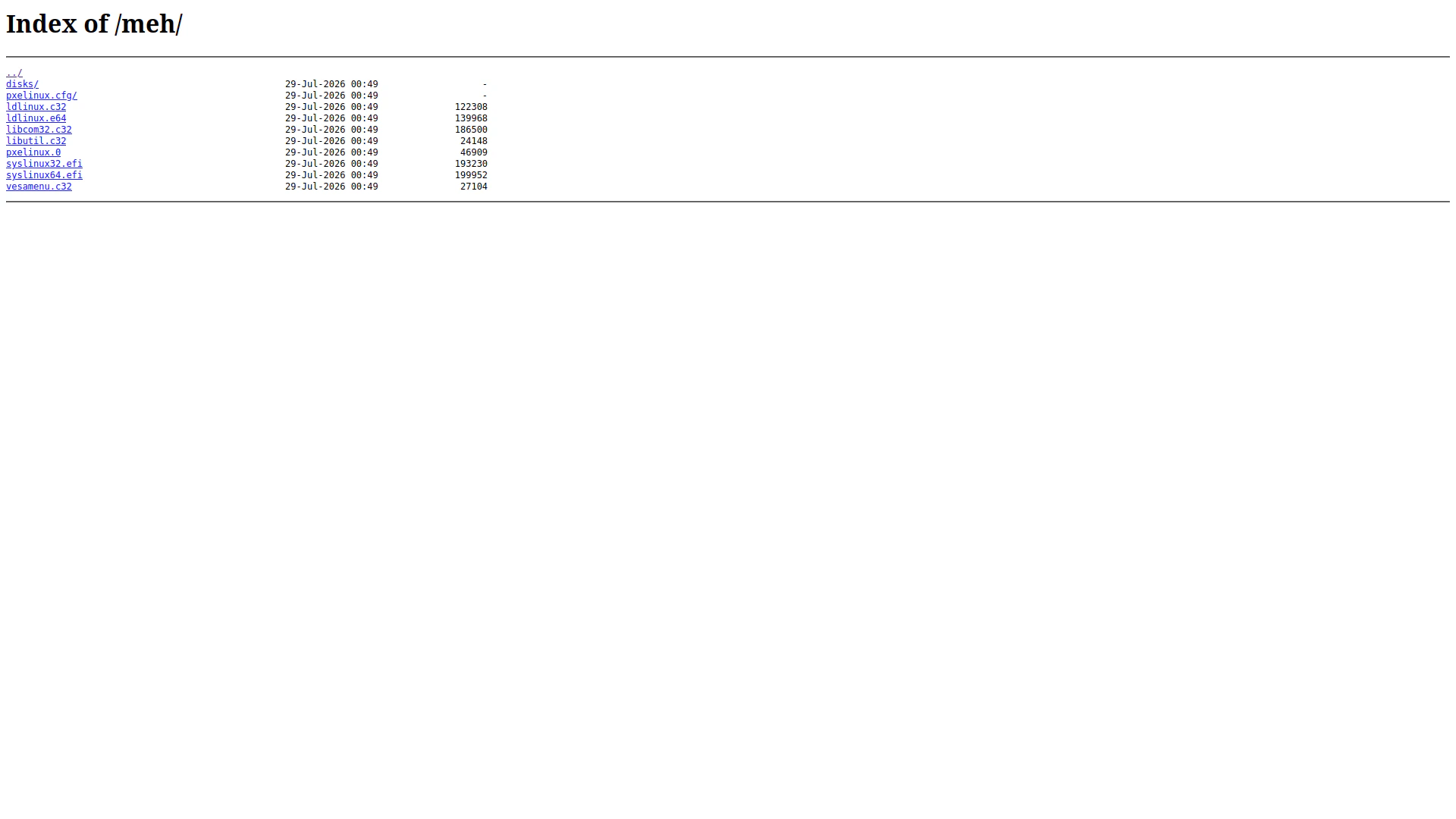
We need to download a few css and js files for this to work and add them to the sysupgrade file list:
1
2
3
4
5
6
7
8
9
10
11
12
13
14
15
uci add_list nginx.http_webdav.include 'conf.d/webdav.include'
uci commit

FILE=/etc/nginx/conf.d/webdav.include
cat << EOF > ${FILE}
sub_filter '</head>' '<meta charset="utf-8"><meta name="viewport" content="width=device-width,initial-scale=1"><meta http-equiv="X-UA-Compatible" content="IE=edge,chrome=1"><link rel="stylesheet" href="/autoindex.css"></head>';
sub_filter '</body>' '<script src="/autoindex.js"></script></body>';
EOF
echo "${FILE}" >> /etc/sysupgrade.conf

FILE=/mnt/pxeboot/autoindex.css
wget https://xptsp.github.io/assets/files/autoindex.js -O "${FILE/css/js}"
wget https://xptsp.github.io/assets/files/autoindex.css -O "${FILE}"
echo "${FILE}" >> /etc/sysupgrade.conf
echo "${FILE/css/js}" >> /etc/sysupgrade.conf
After the customization, http://openwrt.lan:8080 will look something like this: 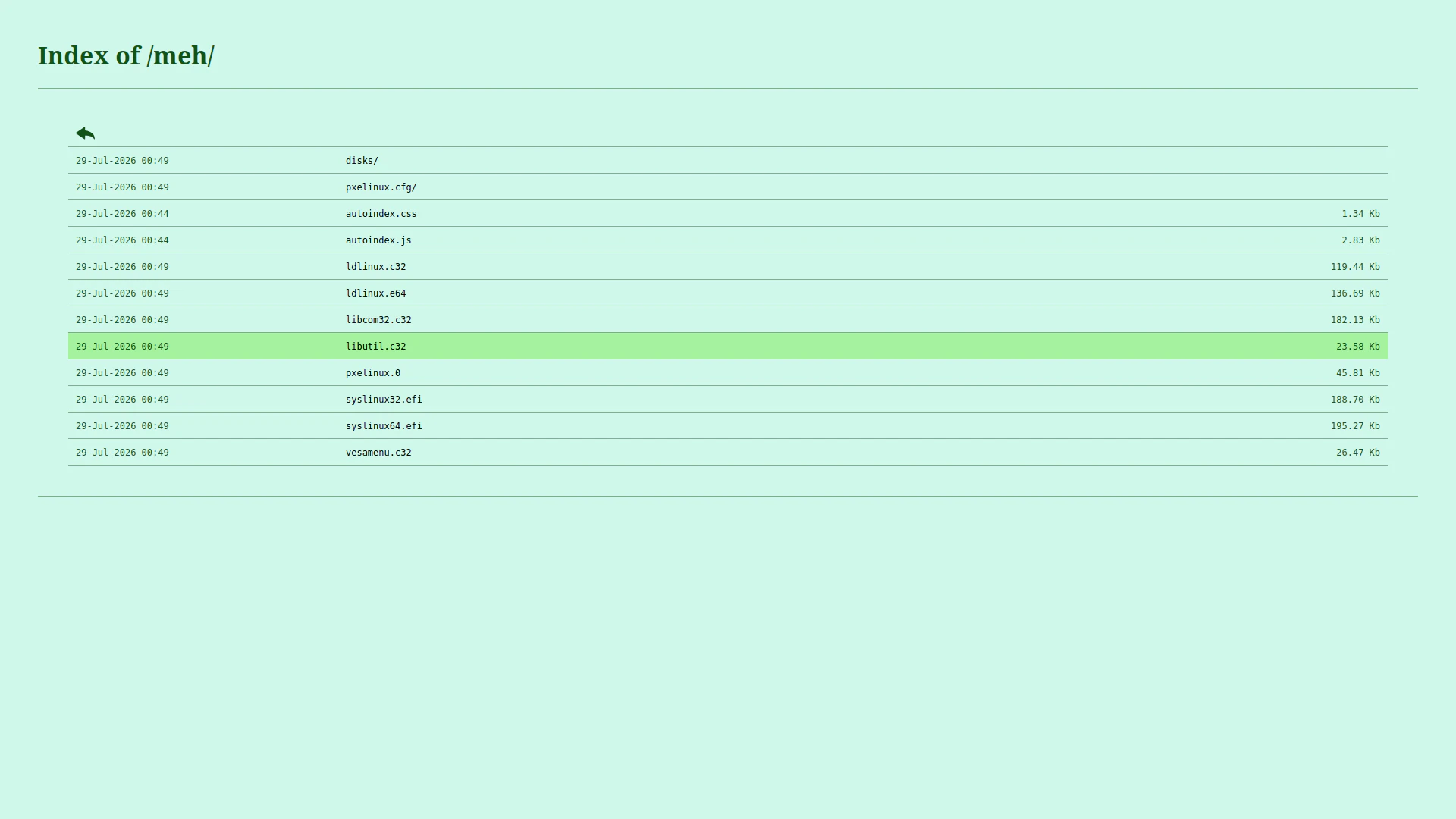
Let’s define a HTTPS service that serves our WebDAV server, and restart networking service.
1
2
3
4
5
6
7
8
9
10
11
12
13
14
uci set nginx.https_webdav=server
uci add_list nginx.https_webdav.listen='443 ssl'
uci add_list nginx.https_webdav.listen='[::]:443 ssl'
uci add_list nginx.https_webdav.include='restrict_locally'
uci add_list nginx.https_webdav.include='conf.d/error_403.locations'
uci set nginx.https_webdav.server_name='webdav.'${DOMAIN}
uci set nginx.https_webdav.ssl_certificate='/etc/acme/'${DOMAIN}'_ecc/'${DOMAIN}'.cer'
uci set nginx.https_webdav.ssl_certificate_key='/etc/acme/'${DOMAIN}'_ecc/'${DOMAIN}'.key'
uci set nginx.https_webdav.ssl_session_cache='shared:SSL:32k'
uci set nginx.https_webdav.ssl_session_timeout='64m'
uci set nginx.https_webdav.access_log='off; # logd openwrt'
uci set nginx.https_webdav.location='/ { proxy_pass http://127.0.0.1:8080; } # WebDAV'
uci commit
service nginx restart
The new domain name is available at https://modem.example.com! Now, I’ll be honest here. I’m not sure how I’ll use this here. But it’s nice to have the option available, especially if we are going to bake this into the firmware…
Adding a 403 error handler to NGINX

I’ve minified my version of the (IMHO: silly) error 403 html page from CodePen. Let’s download it for our router:
1
2
3
FILE=/www/error_403.html
wget https://xptsp.github.io/assets/files/error_403.template -O ${FILE}
echo ${FILE} >> /etc/sysupgrade.conf
We also need a 403 error handler block for NGINX. It converts any 403 error into a 404 error:
1
2
3
4
5
6
7
8
9
10
FILE=/etc/nginx/conf.d/error_403.locations
cat << EOF > ${FILE}
error_page 403 =404 /error_403.html;
location = /error_403.html {
	root /www;
	allow all;
	internal;
}
EOF
echo ${FILE} >> /etc/sysupgrade.conf
Restart NGINX for it to show up when unauthorized access occurs:
1
service nginx restart
Summary
Now we’ve got a router that automatically associates its WAN IP address with a dynamic DNS domain, and a web server that encrypts everything. Also AGH has been configured to use the same SSL certificate that NGINX does, and now has DNS-over-TLS (DoT) and DNS-over-HTTPS (DoH) support.
We’ve still got a few things to add to our router… Onwards to Part 5!